Fouad WhatsApp Download v10.10 Latest Update [August 2026]

Fouad WhatsApp is a third-party modified version of WhatsApp Messenger designed for users who want more control over their messaging experience. While the official WhatsApp app keeps things simple, Fouad WhatsApp adds extra options for privacy, appearance, media sharing, and app customization. This makes it useful for people who want to personalize chats, manage visibility settings, and use features that are not available in the standard version.
With Fouad WhatsApp v10.10, users can access a separate settings area where most of its advanced features are placed. From changing themes and fonts to adjusting privacy controls and media limits, the app gives more flexibility than the regular WhatsApp. It also includes many of the basic WhatsApp features users already know, so the experience feels familiar while offering more options. In this guide, we will cover its main features, latest version details, and important points you should know before Fouad WhatsApp Download.
Information
Fouad WhatsApp App Details
Technical information, version details and release status.
| App Detail | Information |
|---|---|
| App name | Fouad WhatsApp |
| Common names | FouadWA, FMWA, FM WhatsApp |
| Version | 10.10 |
| Developer | FouadMODS |
| Original release date | June 21, 2024 |
| Official release status | Final FouadMODS Update |
| Official base version | WhatsApp 2.24.11.79 |
| File type | Android APK |
| Google Play availability | Not Available |
| Root required | Usually no |
| Page reviewed | August 2026 |
What is Fouad WhatsApp?
Fouad WhatsApp is a modified version of WhatsApp developed by FouadMODS. It keeps the familiar messaging experience but adds more privacy, customization, security, and chat-management options.
The app is mainly designed for people who find the official WhatsApp settings too limited. Instead of changing how messaging works, it gives users more control over what other people can see and how the app behaves.
Its privacy settings are one of the main reasons people use it. You can freeze your last-seen time, hide status views, read deleted messages, and view deleted statuses. You may also hide blue ticks until you reply and reopen View Once media.
These options give users more control during private conversations. For example, Freeze Last Seen keeps your visible activity time fixed. Anti-Delete Messages lets you read a message even after the sender removes it. Show Blue Ticks After Reply delays the read receipt until you answer.
Fouad WhatsApp also includes a built-in app lock. You can protect the full app without installing a separate locking tool. Some versions support a password, pattern, PIN, or fingerprint.
Individual conversations can also be hidden. Once a chat is hidden, it disappears from the normal chat list. You can open the protected area by tapping the Fouad logo and entering your chosen passcode.
Customization goes beyond changing the wallpaper. Users can apply themes, adjust colors, change fonts, edit chat bubbles, and modify the home-screen layout. This makes the app feel more personal than the standard WhatsApp interface.
Other tools may include message scheduling, automatic replies, status downloading, call controls, media-quality settings, and gallery-visibility options.
Fouad WhatsApp is still an unofficial third-party app. It is not developed, approved, or supported by WhatsApp or Meta. Its extra controls may be useful, but they also come with account, privacy, update, and compatibility risks.
How to Download Fouad WhatsApp Latest v10.10 on Android
Since Fouad WhatsApp is a third-party modified app, it is not listed on the Google Play Store. Users who want to install it need to download the APK file directly from a trusted download page. The process is simple and only takes a few steps on an Android phone.
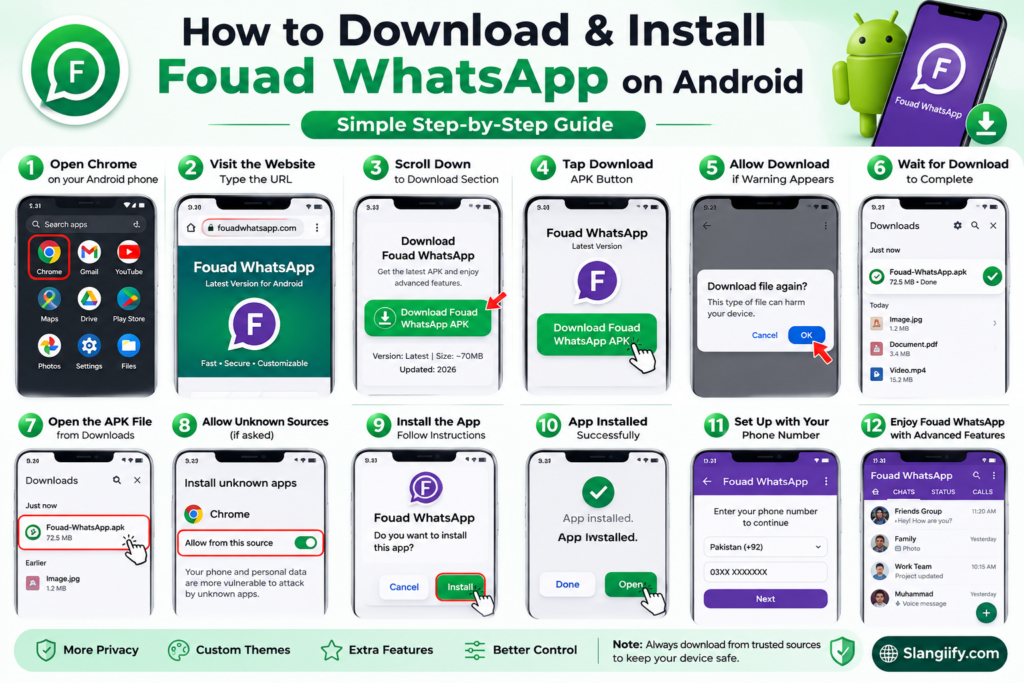
- Open the Chrome browser on your Android phone.
- Type the Fouad WhatsApp download website URL in the search/address bar.
- Open the download page and wait for it to load properly.
- Scroll down until you see the Download Fouad WhatsApp section.
- Tap on the Download Fouad WhatsApp APK button.
- Your browser may show a download warning because it is an APK file. Tap OK or Download anyway if you want to continue.
- Wait for the APK file to download completely.
- Once the download is finished, open the file from your browser downloads or file manager.
- Allow installation from unknown sources if your phone asks for permission.
- Follow the on-screen instructions to install the app.
- After installation, open Fouad WhatsApp and set it up with your phone number.
How to Install Fouad WhatsApp Without Losing WhatsApp Chats
If you are already using the official WhatsApp and want to move to Fouad WhatsApp, you should back up your chats first. This helps you keep your old messages safe before switching to the modified app.
Fouad WhatsApp uses an offline backup and restore option, while the official WhatsApp mainly restores chats through Google Drive. Because of this, the process is a little different.
Note: You will need two Android phones, or one Android phone and one Windows PC.
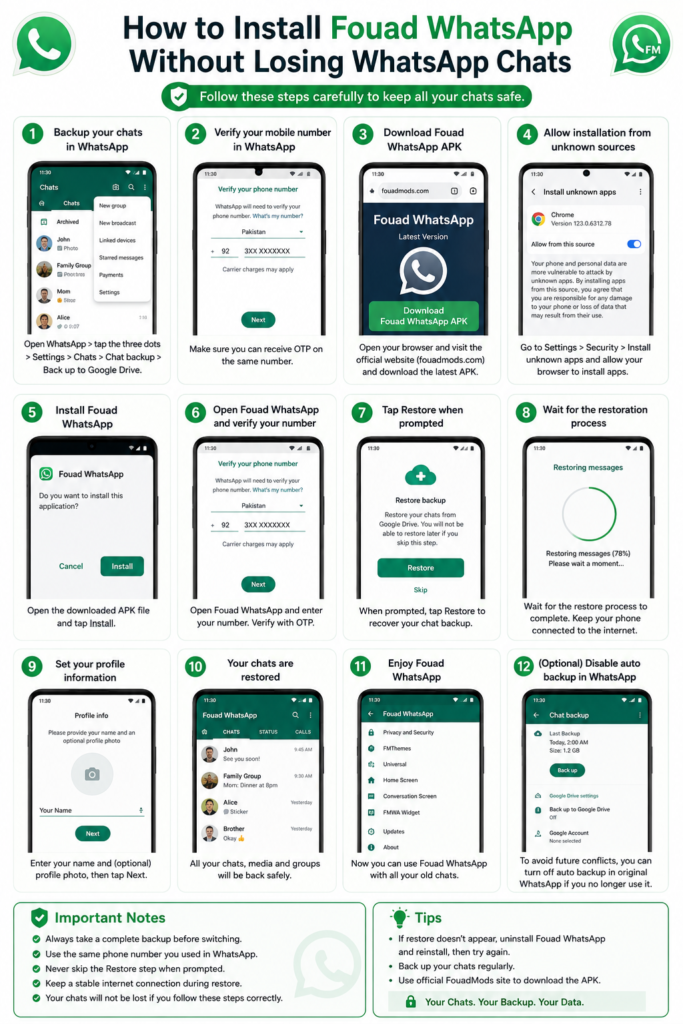
Steps to Move WhatsApp Chats to Fouad WhatsApp
- Open the official WhatsApp Messenger on your main phone.
- Make sure all your important chats are available in WhatsApp.
- Go to Settings.
- Tap on Chats.
- Open Chat Backup.
- Create a fresh backup so your latest chats are saved to Google Drive.
- Once the backup is complete, uninstall WhatsApp from your main phone.
- Install the official WhatsApp on another Android phone.
- Log in with the same mobile number on the second phone.
- During setup, restore your chats from Google Drive.
- After the chats are restored on the second phone, your official WhatsApp will be active there.
- Now download and install Fouad WhatsApp APK on your main phone.
- Open Fouad WhatsApp after installation.
- Tap on Agree and Continue.
- When the phone number screen appears, tap the three dots in the top-right corner.
- Select Link a Device.
- A QR code will appear on Fouad WhatsApp.
- Now open official WhatsApp on your second phone.
- Go to Linked Devices.
- Tap on Link a Device.
- Scan the QR code shown on Fouad WhatsApp.
- Once the QR code is scanned, Fouad WhatsApp should open on your main phone with your WhatsApp chats.
Important Backup Step
- This linked login may not be permanent, so you should create an offline backup inside Fouad WhatsApp right away.
- Open Fouad WhatsApp and go to:
Mods Settings > Universal > Backup and Restore
- Create a full offline chat backup from there.
- After the backup is created, open official WhatsApp on the second phone.
- Go to Three Dots > Linked Devices.
- Log out the Fouad WhatsApp linked device.
- Now open Fouad WhatsApp again on your main phone.
- Instead of tapping Agree and Continue, choose Restore Backup.
- Restore the backup you created inside Fouad WhatsApp.
- Once the backup is restored, enter your phone number.
- Complete the verification process.
- Your Fouad WhatsApp should now be set up with your old chats.
Final Note
This method helps you move from the official WhatsApp to Fouad WhatsApp without losing your chats. Make sure you create a fresh WhatsApp backup first and then make an offline backup inside Fouad WhatsApp. Since Fouad WhatsApp is a third-party app, use it carefully and always keep a backup of your important chats.
Fouad WhatsApp v10.10 Changelog
The genuine v10.10 changelog is much shorter than many download pages suggest.
FouadMODS published the final update on June 21, 2024. The release announcement identified v10.10 as the last FMWA version.
Updated WhatsApp base
Version 10.10 moved to WhatsApp base version 2.24.11.79.
The base version matters because it shows which official WhatsApp build the mod originally used. It does not mean the mod receives every later security or compatibility change.
Caller location information
The update added a caller-location feature.
After a call ended, the app could show the country or city connected with the caller’s number. This information should not be treated as a precise physical location.
It is closer to number-based regional identification.
Increased anti-ban measures
The developer listed improved anti-ban protection.
That wording needs context. “Anti-ban” refers to changes intended to reduce detection. It does not create official protection from account restrictions.
WhatsApp still states that unofficial apps can lead to account limitations or bans.
Extended expiry period
The developer also listed a one-year expiry period.
Modified WhatsApp releases sometimes include an expiry date. Once reached, the build may stop opening or ask for an update.
A longer expiry reduces that immediate problem. It does not ensure that WhatsApp’s servers will continue accepting the app.
Android 14 theme issue
The official notes mentioned a known Android 14 problem.
When changing between dark and light modes, users might also need to change the phone’s system theme. The app’s theme setting may not switch correctly by itself.
Chat bubble glitches
Some bubble styles contained display problems.
The developer stated that no fix was available for those styles. This is a useful detail because it shows that v10.10 was not presented as a perfect release.
Fouad WhatsApp Features
Fouad WhatsApp gives users more options than the regular WhatsApp app. It includes the basic WhatsApp features people already use, but it also adds extra tools for privacy, security, design customization, media sharing, chat control, and daily messaging.
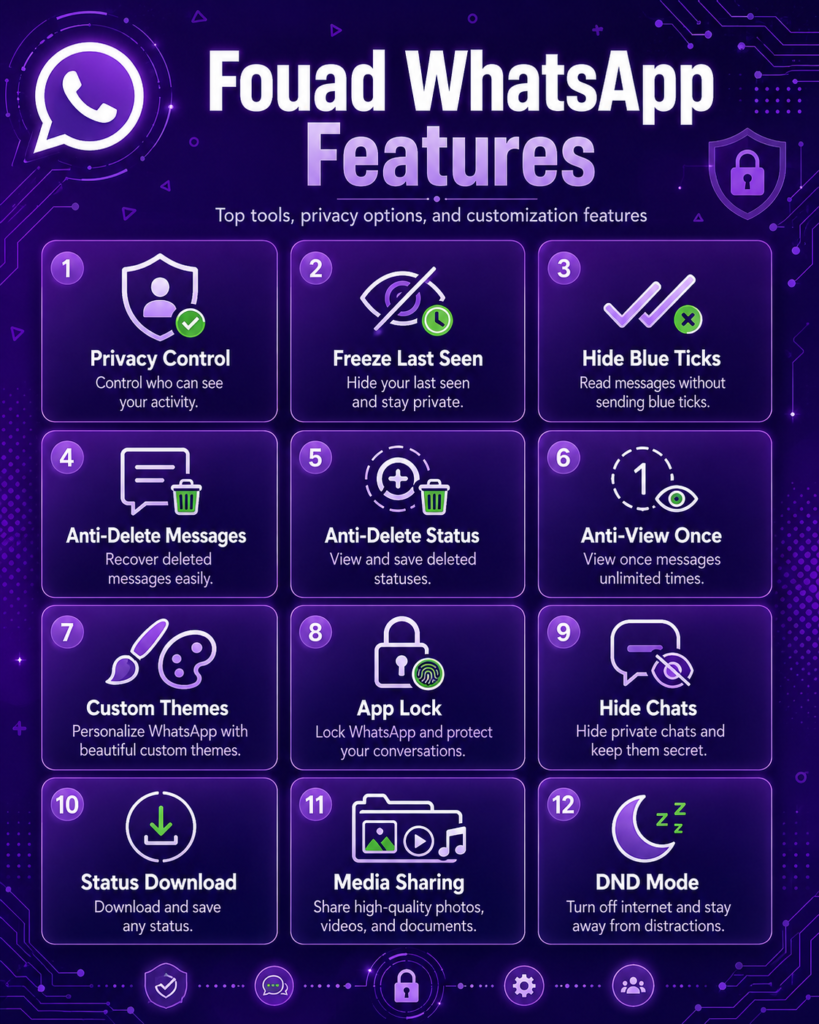
Below are some of the most useful Fouad WhatsApp features that can improve the overall user experience.
Top Features of Fouad WhatsApp
Fouad WhatsApp comes with many extra privacy, control, customization, and messaging features that are not normally available in the official WhatsApp app.
Emoji Variants
Fouad WhatsApp lets you change the default WhatsApp emoji style. You can choose from different emoji packs such as iOS-style emojis, Facebook emojis, Android emojis, system emojis, and more.
Freeze Last Seen
This feature allows you to freeze your last seen at a specific time. Once enabled, your contacts will see the same last seen time until you turn the option off.
Anti-View Once
With this option enabled, you may be able to view “View Once” media more than one time instead of losing access after opening it once.
Disable Forwarded Tag
When you forward a message on normal WhatsApp, it usually shows a “Forwarded” label. Fouad WhatsApp gives you an option to remove that tag from forwarded messages.
Hide View Status
This privacy option lets you watch someone’s WhatsApp status without your name appearing in their status viewers list.
Anti-Delete Status
If someone deletes a status before it expires, this feature may still allow you to view it from your side.
Anti-Delete Messages
When someone sends a message and deletes it for everyone, Fouad WhatsApp can keep that message visible for you.
Show Blue Ticks After Reply
This option gives you more control over read receipts. The sender will only see blue ticks after you reply to their message.
WhatsApp Lock
Fouad WhatsApp includes a built-in app lock. You can protect your chats with a PIN, password, or pattern without installing a separate app locker.
Control Who Can Call You
This feature is useful if you receive unwanted WhatsApp calls. You can choose who is allowed to call you and block calls from unknown or selected contacts.
FMThemes
Fouad WhatsApp includes a theme section where you can explore and apply different themes. You can also back up and restore your theme settings.
Hide Media from Gallery
If you do not want WhatsApp photos and videos to appear in your phone gallery, this option can hide received media from the gallery.
Backup and Restore
Fouad WhatsApp offers an offline backup and restore option. You can create a local backup of your chats, restore it later, or delete an old backup and create a new one.
Always Online
This feature can show your account as online even when you are not actively using the app. It may be useful for business or customer support accounts.
Increase Forward Limit
Fouad WhatsApp allows users to increase the message forwarding limit. This can save time when sharing the same message with multiple contacts.
Send Images in Full Resolution
Normal WhatsApp often compresses images, which can reduce quality. Fouad WhatsApp gives you an option to send images in better or full resolution.
Message Scheduler
This feature lets you schedule messages for a specific date and time. It can be helpful for birthday wishes, reminders, business replies, or planned updates.
Auto Reply
Auto Reply is useful for users who manage customer messages on WhatsApp. You can set a custom reply that is sent automatically when someone messages you.
Mass Message Sender
This tool allows you to send one message to multiple contacts or groups at the same time without sending it manually one by one.
Airplane Mode
Fouad WhatsApp’s Airplane Mode works like a do-not-disturb option inside the app. When enabled, WhatsApp messages and calls will not disturb you.
Hide WhatsApp Chats
You can hide private chats and secure them with a PIN or pattern. Hidden chats can be accessed through the special hidden chat option inside the app.
How to Use Fouad WhatsApp on PC
Fouad WhatsApp is mainly made for Android phones, but you can also use it on a Windows PC with the help of an Android emulator. An emulator creates an Android-like space inside your computer, where you can install and run mobile apps. One of the commonly used emulators for this purpose is BlueStacks.
Follow these steps to install Fouad WhatsApp on your PC:
- Open any browser on your Windows PC.
- Visit the official BlueStacks website.
- Go to the BlueStacks download page.
- Download the latest BlueStacks.exe file.
- Once the file is downloaded, open it and install BlueStacks on your PC.
- After installation, launch BlueStacks and complete the basic setup.
- Now download the Fouad WhatsApp APK file on your PC.
- Once the APK file is downloaded, you may see it with the BlueStacks icon.
- Double-click on the APK file.
- BlueStacks will automatically start installing Fouad WhatsApp.
- After installation, open BlueStacks.
- Go to the app drawer or home screen inside BlueStacks.
- Click on the Fouad WhatsApp icon to launch the app.
- Now you can use Fouad WhatsApp on your PC.
Login Note
When you open Fouad WhatsApp on PC, it may show a QR code instead of the normal phone number signup screen. In that case, you can use the Linked Devices option from your main WhatsApp account, just like WhatsApp Web.
If you want to register with a mobile number, tap the three dots in the top-right corner of the QR code screen. From there, choose the option to enter your phone number and complete signup with OTP verification.
Fouad WhatsApp FAQs
Find clear answers about Fouad WhatsApp features, installation, updates, privacy options, chat backups, themes, and account safety.
01 What is Fouad WhatsApp?
Fouad WhatsApp is a modified version of the official WhatsApp app. It offers extra privacy settings, theme options, chat controls, media sharing features, and other tools that are not available in the regular WhatsApp Messenger.
02 Is Fouad WhatsApp available on the Google Play Store?
No, Fouad WhatsApp is not available on the Google Play Store because it is a third party modified app. Users usually download it as an APK file from a web source.
03 Is Fouad WhatsApp safe to use?
Fouad WhatsApp is not an official WhatsApp product, so users should be careful before installing it. Apps downloaded outside official stores may create privacy, security, or account risks. Keep a backup of important chats and review app permissions carefully.
04 Can I use Fouad WhatsApp without losing my chats?
It may be possible to transfer chats from official WhatsApp to Fouad WhatsApp. Create a fresh backup before making any changes. Its offline backup and restore option may also help protect locally stored chat data.
05 What are the main features of Fouad WhatsApp?
Popular features include hiding last seen, anti delete messages, anti delete status, hidden status views, custom themes, an app lock, a message scheduler, automatic replies, full resolution image sharing, and hidden chats.
06 Can I use Fouad WhatsApp on PC?
Fouad WhatsApp may be used on a Windows computer through an Android emulator such as BlueStacks. After installing the emulator, users can install the APK and run it as an Android application.
07 Does Fouad WhatsApp support themes?
Yes, Fouad WhatsApp includes FMThemes, which allows users to apply different themes and customize the appearance of the app. Theme settings may also be backed up and restored.
08 Can I hide chats in Fouad WhatsApp?
Yes, users can hide selected chats and protect them with a PIN or pattern. This feature helps keep private conversations separate from the main chat screen.
09 Does Fouad WhatsApp have an app lock?
Yes, Fouad WhatsApp includes a built in app lock. Depending on the version, users may protect the app with a passcode, pattern, or PIN without installing a separate locker application.
10 How do I update Fouad WhatsApp?
Users generally update Fouad WhatsApp by downloading a newer APK and installing it over the existing version. Create a chat backup before updating to reduce the risk of losing conversations or settings.
11 Can Fouad WhatsApp show deleted messages?
Fouad WhatsApp includes an anti delete messages option. When enabled, a message removed by its sender may remain visible on the recipient’s device.
12 What is Anti View Once in Fouad WhatsApp?
Anti View Once is a feature that may allow View Once media to be opened more than one time. It changes the normal one time viewing restriction on the user’s device.
13 Is Fouad WhatsApp better than official WhatsApp?
Fouad WhatsApp provides more customization, privacy controls, and media options. However, official WhatsApp is generally the safer and more stable choice because it is distributed through official app stores and supported by WhatsApp.
14 Can Fouad WhatsApp ban my number?
Using a modified WhatsApp application can create an account restriction or ban risk. Fouad WhatsApp is not officially supported, so users should understand this risk and keep backups of important conversations.
15 Why should I update Fouad WhatsApp regularly?
New versions may contain bug fixes, performance improvements, compatibility changes, and updated features. However, users should verify the source and back up their data before installing an update.
Final Thoughts
Fouad WhatsApp gives users more control over how they chat, share media, manage privacy, and customize the app. It keeps the basic WhatsApp experience familiar, but adds extra options that many users do not get in the official version. From hiding chats and locking the app to changing themes, managing blue ticks, and using advanced privacy settings, the app is built for users who want more flexibility.
Overall, Fouad WhatsApp can be a useful choice for people who prefer a more customizable messaging experience. However, since it is a third-party app, users should download it carefully, keep their chats backed up, and update to the latest version whenever a new release is available. This helps improve performance, fix known issues, and keep the app running more smoothly.